
Thank You #5
Pairs well with
Product Details
Social Media Graphics
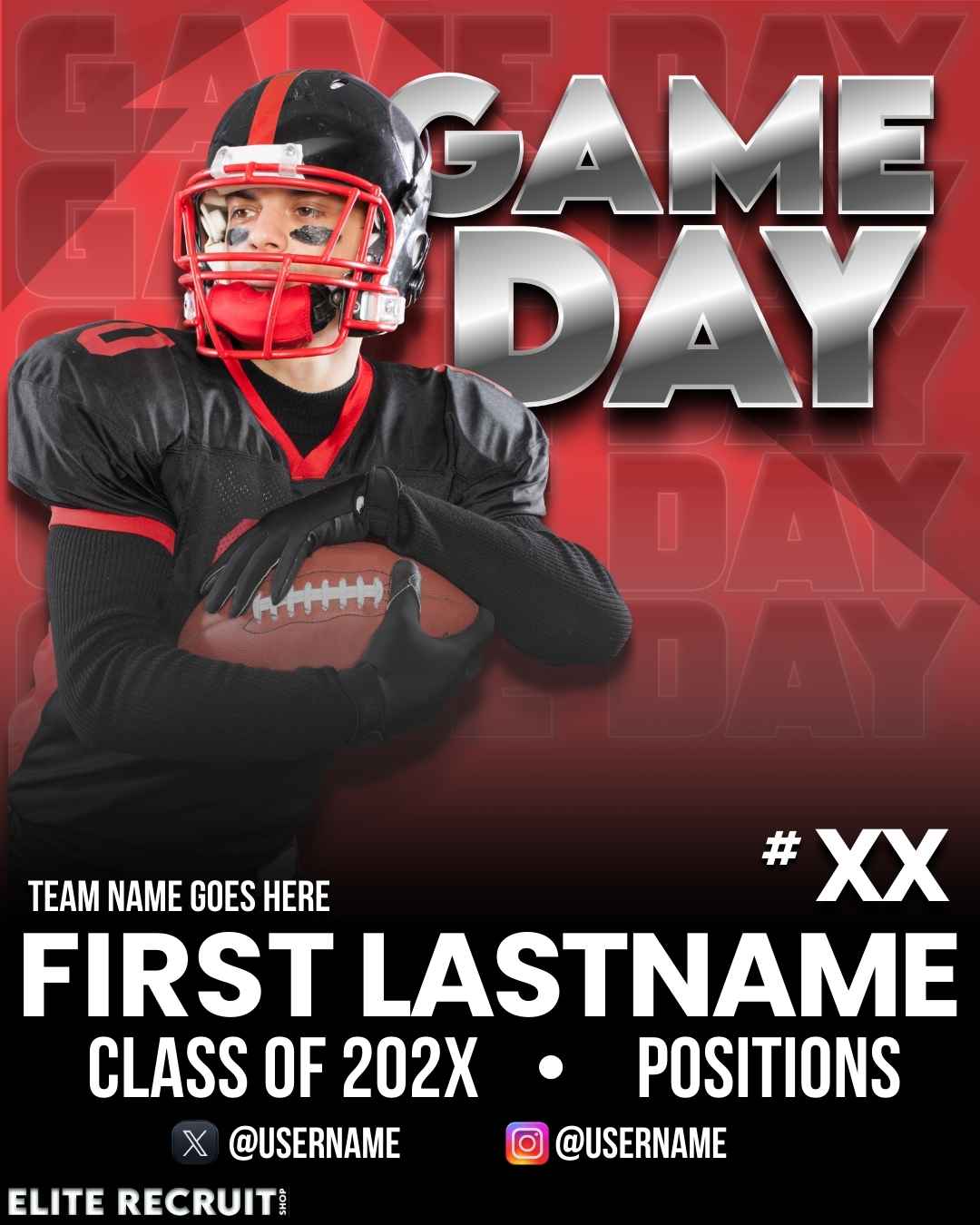
Game Day Graphic – Editable Social Media Template
Stand out on social media with a custom game day graphic! After purchase, simply add your game details using Instagram’s editor and share it with your followers. No design skills needed, just plug in the info and post!
✔ Use it over and over
✔ Easy to edit on Instagram
✔ Perfect for showcasing your game details
Get yours now and rep your team like a pro! ⚽🔥
How can this help me?
Boost Your Recruiting Exposure with Game Day Graphics
College coaches and recruiters are always looking for the next standout athlete, but they can’t watch everyone at once. Make it easy for them to follow your journey!
By posting a custom game day graphic before each match, you’re keeping your followers, and potential recruiters, updated on where and when you’re playing. This keeps you on their radar and increases your chances of being seen.
🔹 Social Media Exposure: Share your schedule with your network, allowing coaches to track your games in real time.
🔹 Pre-Event Emails: Send your graphic directly to coaches before big events, giving them all the details in one quick glance.
🔹 Consistent Branding: A professional, polished post makes you look serious about your sport and your recruiting process.
Stay ahead of the competition and make sure the right people know where to find you! 💪⚽
How do I add my game info?
How to Add Game Info to Your Graphic Using Instagram Editor
Once you’ve purchased and downloaded your custom game day graphic, follow these simple steps to personalize it and share it with your followers:
Step 1: Open Instagram and Start a New Post
- Open Instagram and tap the ➕ (plus icon) to create a new post.
- Select your downloaded game day graphic from your camera roll.
Step 2: Add Your Game Details
- Tap “Aa” (Text Tool) at the top of the screen.
- Type in your game time, location, opponent, and any other important details.
- Customize your text by adjusting the font, size, color, and placement to fit the graphic.
Step 3: Enhance with Stickers & Tags
- Use the @mention sticker to tag your teammates, coaches, or school.
- Add hashtags like #GameDay, #Recruiting, or #NextLevel to increase visibility.
- Include location tags so people (including coaches) can see where you’re playing.
Step 4: Add a Song for Extra Hype 🎵
- Tap the Music icon before posting.
- Search for your favorite pre-game hype song to match the energy of your upcoming game.
- Adjust the song snippet to play the best part when people view your post.
Step 5: Share & Get Noticed!
- Tap “Next” and write a short caption (e.g., “Locked in for game day! ⚽🔥”)
- Share it to your feed and story to maximize visibility.
- Consider sending it directly to coaches via Instagram DMs or in a pre-event email.
🚀 Pro Tip: Coaches love consistency! Make this a habit before every game so they always know where and when to find you on the field.
Tips for Recruiting Specific Social Media
The Power of Social Media for Recruiting – Get Noticed Beyond Your Network
Social media is no longer just for sharing highlights, it’s a game-changing recruiting tool that can help athletes connect with college programs they may not have even considered. By consistently posting your game schedules, highlights, and achievements, you’re expanding your reach beyond just the schools you’ve contacted.
Why Social Media is a Must for Recruiting
🔹 Increased Exposure – Your profile isn’t limited to just the coaches you email. Programs you hadn’t considered—or that weren’t initially interested—might discover your talent.
🔹 Direct Coach Interaction – Many college coaches actively scout players on platforms like Instagram, Twitter-X. Your posts make it easy for them to follow your journey.
🔹 Showcase Personality & Work Ethic – Beyond stats and highlights, coaches look for leadership, discipline, and how athletes engage with their team and community. Your social media presence helps tell that story.
🔹 Keeps You Top of Mind – Regularly posting updates makes it easy for coaches to track your progress and know where to find you.
Staying Smart & Safe Online
While social media is a powerful tool, it’s important to be mindful of what you’re sharing and who’s following you.
✔ Be selective with personal details – Avoid posting your exact home address or too much personal info. Stick to game-related updates.
✔ Know your audience – Keep an eye on who follows your accounts. If an account looks suspicious, don’t be afraid to block or remove it.
✔ Limit real-time location sharing – It’s great to post about upcoming games, but be mindful of sharing exact locations in real-time, especially if your account is public.
✔ Use social media for recruiting, not venting – Coaches pay attention to your behavior online. Keep your posts professional, positive, and focused on your athletic journey.
Bottom Line: Social media can open doors to unexpected opportunities, but it’s important to use it wisely. Stay active, stay professional, and stay aware, your next big opportunity could be just one post away! 🚀🔥
If you have any questions, you are always welcome to contact us. We'll get back to you as soon as possible, within 24 hours on weekdays.
-
Shipping Information
Use this text to answer questions in as much detail as possible for your customers.
-
Customer Support
Use this text to answer questions in as much detail as possible for your customers.
-
FAQ’s
Use this text to answer questions in as much detail as possible for your customers.
-
Contact Us
Use this text to answer questions in as much detail as possible for your customers.
FAQs
Please read our FAQs page to find out more.
Frequently asked question
Use this text to answer questions in as much detail as possible for your customers.
Frequently asked question
Use this text to answer questions in as much detail as possible for your customers.
Frequently asked question
Use this text to answer questions in as much detail as possible for your customers.
Frequently asked question
Use this text to answer questions in as much detail as possible for your customers.
Frequently asked question
Use this text to answer questions in as much detail as possible for your customers.